
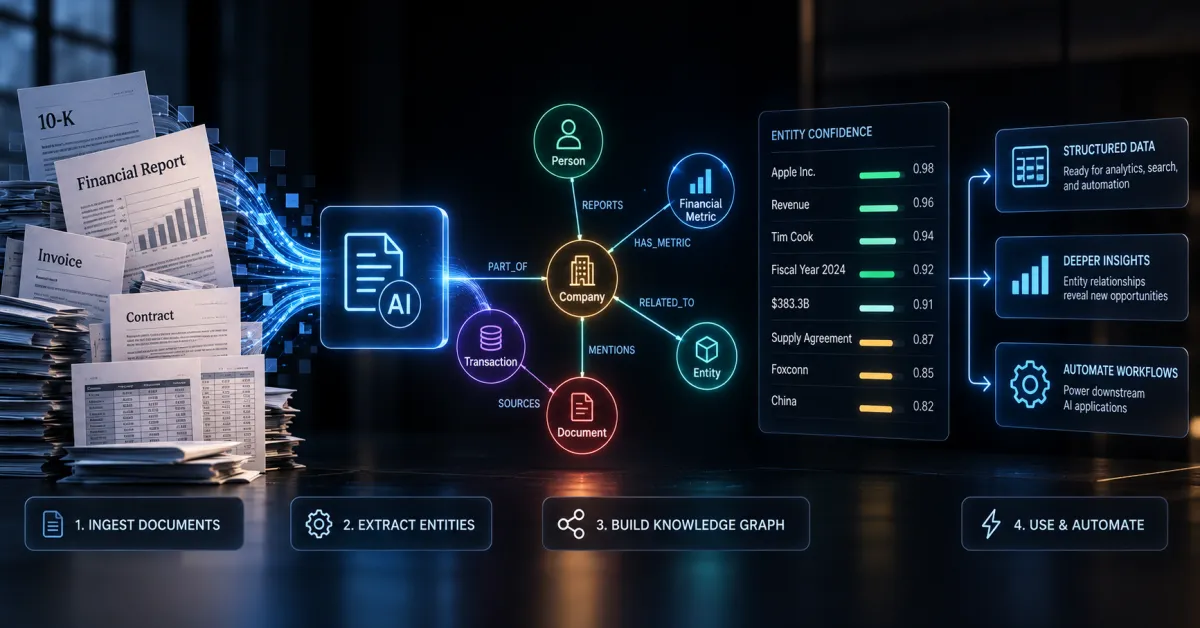
Financial document extraction is a mess. Invoices, contracts, regulatory filings, bank statements – they’re all formatted differently, buried in PDFs, and full of data that matters but isn’t easy to pull out. Most companies still rely on manual data entry or fragile rule-based systems that break the moment a vendor changes their template.
Knowledge graphs offer a smarter approach. Instead of treating documents as isolated files, you build a structured representation of entities, relationships, and attributes that actually reflects how financial data connects in the real world. Think of it as creating a map where every invoice, vendor, account, and transaction knows how it relates to everything else.
Knowledge graph design patterns for financial document extraction are proven architectural approaches that let you systematically extract, organize, and query financial data with minimal manual intervention. They work by defining entity types (vendors, amounts, dates), relationship patterns (payments, invoices, approvals), and extraction rules that adapt to document variations while maintaining data integrity.
Why Standard Extraction Falls Apart
Most organizations start with optical character recognition (OCR) and regex patterns. It works fine until it doesn’t. A vendor changes their invoice layout. A currency symbol appears in an unexpected place. Suddenly you’re drowning in data quality issues.
The real problem is that these approaches treat documents as flat text. They don’t understand that an invoice is a semantic object – it has a vendor, an amount, a date, line items, and relationships to purchase orders and payments. Without capturing that structure, you end up with extracted data that’s technically correct but contextually useless.
Knowledge graphs flip this. Instead of extracting “Invoice 12345 for $5,000,” you extract structured relationships – Vendor X submitted Invoice 12345, which references PO 67890, totaling $5,000 USD, due on Date Y. Now your system understands the data, not just the text.
Core Design Patterns That Actually Work
The Entity-Relationship Pattern
Start by defining your core entities. In financial documents, these typically include vendors, invoices, line items, accounts, dates, and amounts. Each entity has properties – a vendor has a name, tax ID, and payment terms. An invoice has a number, date, and total.
Then map relationships. An invoice is submitted by a vendor. It contains multiple line items. Each line item references a general ledger account. These relationships are where the real value lives. When you can traverse from an invoice to its vendor to their payment history to their contract terms, you’ve built something useful.
The pattern works because it mirrors how financial professionals actually think about documents. You’re not fighting against human intuition – you’re automating it.
The Hierarchical Extraction Pattern
Financial documents have natural hierarchies. An invoice contains sections. Sections contain line items. Line items contain fields. Extract from the top down, validating at each level.
Start by identifying document type (invoice, PO, statement). Then extract the header section (vendor, date, total). Then extract line items. Then extract footer details (payment terms, approvals). This staged approach lets you apply different rules at different levels and catch errors early.
If a line item extraction fails, you know which invoice and which section caused the problem. This beats the alternative – a flat extraction that produces garbage data with no way to trace where it went wrong.
The Confidence Scoring Pattern
Not every extraction is equally reliable. A vendor name extracted from a clearly printed header is more trustworthy than an account code extracted from a handwritten note in a scanned document. Build confidence scores into your extraction results.
This lets downstream systems make intelligent decisions. High-confidence extractions go straight to automation. Medium-confidence results get flagged for review. Low-confidence extractions get escalated. You’re not pretending your system is perfect – you’re being honest about what it knows and doesn’t know.
Building the Implementation – Step by Step
Step 1 – Define Your Schema
Before you extract anything, define what success looks like. Create a formal schema that describes every entity type, every relationship, and every attribute you care about. Use something like JSON Schema or RDF for this – something machine-readable.
Be specific. Don’t just say “amount” – specify currency, whether it includes tax, precision (cents or whole dollars), and validation rules. Don’t just say “date” – specify format, timezone handling, and whether it’s document date or processing date.
This upfront work saves you months of debugging later.
Step 2 – Collect and Annotate Training Data
You need examples. Grab 50-100 real documents from your actual workflow – not sanitized samples, but the messy stuff you actually deal with. Vendor templates that are slightly different. Scanned documents with varying quality. International invoices with different formats.
Manually annotate these documents against your schema. Tag entities, mark relationships, note confidence levels. This is tedious, but it’s the foundation everything else rests on. Use annotation tools like Prodigy or Label Studio – they’re worth the investment.
Step 3 – Build Entity Extractors
Use a combination of approaches. Named entity recognition (NER) models work well for vendors, dates, and amounts. Rule-based extractors work well for structured fields like invoice numbers. Layout-based extractors work well for documents with consistent formatting.
Don’t rely on a single approach. Use an ensemble – run multiple extraction methods and combine results using confidence scores and conflict resolution rules. If an NER model and a rule-based extractor disagree, you have a signal that something needs human review.
Step 4 – Define Relationship Extraction Rules
Once you’ve extracted entities, connect them. If you found an invoice and a vendor on the same document, they’re related. If you found a line item and an amount on the same line, they’re related. Write rules that capture these patterns.
Use proximity rules (entities close together are likely related), layout rules (entities in the same column or section are likely related), and semantic rules (a date near the word “due” is likely a due date, not an invoice date).
Step 5 – Validate and Score
Build validation rules that check extracted data for consistency and completeness. An invoice total should equal the sum of line items. A vendor name should match known vendors. A date should be within a reasonable range.
Calculate confidence scores based on extraction method, validation results, and consistency checks. Flag anything below your threshold for human review.
Step 6 – Store in a Graph Database
Use a proper graph database like Neo4j or Amazon Neptune. Relational databases work, but graph databases are built for exactly this – storing entities and relationships efficiently and querying them intuitively.
Store your extracted data with confidence scores, extraction method, and source document reference. This gives you full traceability – you can always trace a query result back to the original document and extraction method.
Common Mistakes That Will Bite You
Assuming 100% accuracy is possible. It’s not. Build human review into your workflow from day one. Design your system to catch and flag uncertain extractions, not to hide them.
Ignoring document variations. One vendor’s invoice looks nothing like another’s. Your schema and extraction rules need to handle this. Test against real variation, not just clean samples.
Extracting without understanding context. A number might be an amount, a quantity, or an account code depending on context. Your extractors need to understand what they’re looking at, not just pattern-match on numbers.
Treating extraction as one-time work. Documents change, vendors change formats, regulations change. Plan for ongoing model refinement and rule updates.
Real Tools Worth Using
Document parsing – PyPDF2 or pdfplumber for text extraction, Tesseract or AWS Textract for OCR.
NER and entity extraction – spaCy with financial-tuned models, or transformer-based models like DistilBERT fine-tuned on your data.
Graph storage – Neo4j for on-premise, Amazon Neptune for cloud, or TigerGraph if you need serious scale.
Workflow orchestration – Airflow or Prefect to manage extraction pipelines and validation steps.
Annotation and review – Prodigy for annotation, or build a simple web interface for human review queues.
FAQ
How long does it take to build this?
For a small-scale implementation (single document type, 100-1000 documents monthly), expect 4-8 weeks. For enterprise scale (multiple document types, millions of documents), expect 3-6 months. Most of the time goes to data annotation and rule refinement, not infrastructure.
Can you use large language models instead?
Partially. LLMs are good at understanding document context and handling variation, but they’re expensive at scale and their outputs aren’t always structured. Use them for initial extraction, then validate and structure the results with your graph schema. Hybrid approaches work better than pure LLM or pure rule-based.
What if documents are handwritten or heavily scanned?
OCR quality matters. Invest in good OCR (AWS Textract beats open-source options). Handwritten documents are harder – you’ll need higher human review rates. Consider whether the ROI justifies automation for low-quality documents, or if manual processing is cheaper.
How do you handle multi-page documents?
Treat each page as a separate extraction target, then stitch results together based on document structure. An invoice might span pages – extract from each page, then merge results using document IDs and page numbers. This is why hierarchical extraction patterns matter.
What about compliance and audit trails?
Store everything – original document, extracted data, confidence scores, extraction method, timestamp, and any human corrections. Make this queryable. When auditors ask “where did this number come from,” you have a complete answer.
Quick Recap
Knowledge graph design patterns transform document extraction from a fragile, manual process into something scalable and maintainable. You define entities and relationships upfront, extract systematically with confidence scoring, validate rigorously, and store everything in a structure that lets you query and understand the data later.
It requires upfront work – schema design, data annotation, rule building. But it scales. Once your patterns are solid, you’re extracting thousands of documents reliably, catching errors automatically, and maintaining audit trails that actually satisfy compliance teams.
If you’re still manually processing financial documents or wrestling with extraction pipelines that break constantly, this is worth the investment.