Your documentation is probably a mess. Old wikis, scattered markdown files, outdated README files buried three folders deep – the usual digital archaeology project that nobody wants to touch. Now you’re hearing about CLAUDE.md files and wondering if this is actually worth the effort, or just another documentation trend that’ll be forgotten in six months.
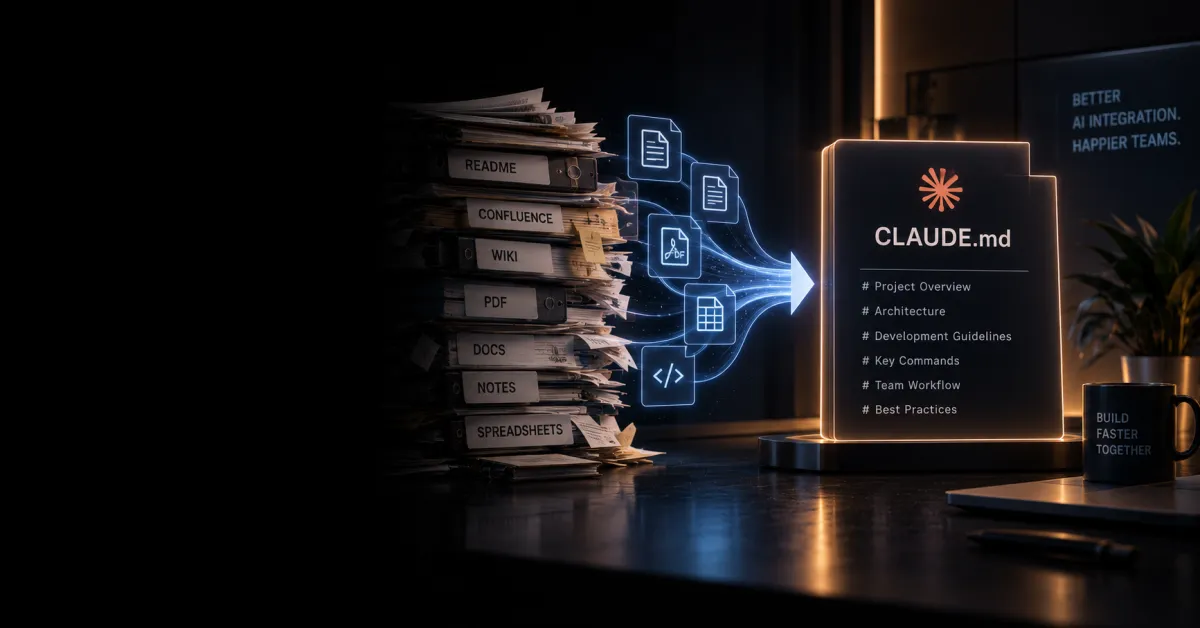
Converting legacy documentation into CLAUDE.md files is about taking your fragmented, hard-to-maintain documentation and restructuring it into a standardized format that AI tools like Claude can actually parse, understand, and work with effectively. It’s not just renaming files – it’s reorganizing your knowledge in a way that makes both humans and AI understand what you’re actually trying to say.
Why Your Current Documentation is Holding You Back
Let’s be honest – legacy documentation exists in a thousand different formats. You’ve got Word docs that nobody can find, confluence pages with broken links, README files that haven’t been updated since 2019, and tribal knowledge that lives only in someone’s head. The problem isn’t that the information doesn’t exist. It’s that it’s scattered, inconsistent, and basically useless when you actually need it.
When you try to feed this chaos into an AI system, it gets confused. Claude might grab a snippet from a ten-year-old guide, miss critical context from another file, or waste time parsing formatting instead of understanding content. The AI becomes less useful, you blame the tool, and your documentation stays broken.
CLAUDE.md files solve this by creating a standardized structure that AI systems can reliably work with. Think of it as giving your documentation a lingua franca.
What Makes a CLAUDE.md File Different
CLAUDE.md Format – A structured documentation file that uses consistent metadata, clear hierarchies, and semantic organization designed for both human readability and AI comprehension. It typically includes frontmatter (YAML or JSON metadata), clear section hierarchies, code examples with context, and explicit relationships between concepts.
A proper CLAUDE.md file isn’t just markdown with a fancy name. It includes several key elements that standard documentation often skips:
- Metadata headers that tell AI what type of content this is, who should read it, and what it depends on
- Clear purpose statements at the top so there’s no confusion about what the document covers
- Explicit relationships between concepts – not just links, but actual semantic connections
- Structured examples with context, not just code dumps
- Consistent formatting that doesn’t require the AI to guess what you meant
This structure means Claude can understand not just what you wrote, but why you wrote it, what it connects to, and how it fits into the bigger picture.
The Conversion Process That Actually Works
Converting legacy documentation isn’t a weekend project. But it doesn’t need to be a year-long nightmare either. Here’s the realistic approach:
Step 1 – Audit What You Actually Have
Start by cataloging your documentation chaos. Don’t try to fix everything at once – that’s how projects die. List out every documentation source: wikis, readme files, API docs, internal guides, everything. Note which ones are actively used and which are just digital clutter.
Step 2 – Prioritize by Impact
Convert the documentation that actually matters first. If your API documentation is a nightmare and developers complain about it constantly, start there. If you have a 50-page guide that nobody reads, it can wait. Focus on documents that either get used frequently or contain critical information.
Step 3 – Create Your CLAUDE.md Template
Don’t overcomplicate this. Your template should include frontmatter with basic metadata, a purpose section, main content with clear headings, code examples with explanations, and links to related documents. Keep it simple enough that your team will actually use it.
Step 4 – Convert in Batches
Take related documents together – all your API docs, or all your setup guides. This helps you maintain consistency and catch patterns in how information should be organized. Batch conversion also makes it easier to establish relationships between documents.
Step 5 – Test with Claude
Actually feed your converted files to Claude and see if it understands them the way you intended. Ask it questions about the documentation, have it summarize sections, ask it to find connections between documents. If it gets confused, your structure needs adjustment.
Common Mistakes That Derail Conversions
Most documentation conversion projects fail not because the concept is wrong, but because people make predictable mistakes:
Trying to convert everything at once – You’ll burn out your team and end up with half-finished conversions. Pick a subset, do it right, then expand.
Keeping the old organizational structure – Your legacy documentation is probably organized the way it grew, not the way it should be organized. Use the conversion as an opportunity to restructure logically. If your API docs are scattered across twelve different files, consolidate them.
Ignoring metadata – The metadata is what makes CLAUDE.md files actually useful to AI systems. If you skip it, you’re just renaming files. Include version info, dependencies, audience level, and update status.
Not removing outdated content – This is your chance to delete the stuff that’s been wrong for three years. If it’s not current, it shouldn’t make the transition.
Forgetting about maintenance – A CLAUDE.md file isn’t a one-time conversion. You need a process for keeping it updated. If you don’t, it becomes legacy documentation again in six months.
Tools That Actually Help
You don’t need much to make this work. A good text editor with markdown support, version control (git, obviously), and possibly a documentation generator if you want to create a searchable interface. Some teams use Obsidian for managing interconnected documentation, which pairs well with CLAUDE.md structure because it handles relationships naturally.
AI tools like Claude itself can help with the conversion – you can feed it old documentation and ask it to restructure it into CLAUDE.md format. It won’t be perfect, but it’ll give you a starting point that’s way better than manually rewriting everything.
FAQ – Real Questions About This
Do I need to convert ALL my documentation at once?
No, and you shouldn’t. Start with the most critical or frequently-used documentation. Once you’ve got a working system and your team understands the format, expand from there. A partially converted documentation system is better than a broken one that’s completely converted.
What if my team doesn’t want to change how they document things?
Make it easier, not harder. If your new process requires three extra steps, it won’t stick. Keep the CLAUDE.md template simple, show how it actually helps when working with AI tools, and maybe most importantly – don’t make it feel like busywork. Show how better documentation means fewer questions and faster onboarding.
Will this work with documentation that’s highly technical or specialized?
Absolutely. In fact, technical documentation often benefits most from this approach because the relationships between concepts matter more. Your metadata can specify domain knowledge requirements, link to prerequisites, and help AI systems understand context.
How do I know if the conversion is actually working?
Ask Claude questions about your documentation and see if it gives accurate answers. Have new team members use the CLAUDE.md files to onboard and track how long it takes. Measure whether developers are finding answers faster. If these things improve, it’s working.
What happens to documentation that’s still in the old format?
You can run both systems in parallel during transition, but that’s messy. Better approach – convert critical stuff first, then give yourself a deadline to migrate the rest. After that date, the old format is archived, not active. This forces you to actually complete the transition instead of maintaining two systems forever.
Wrapping Up
Converting legacy documentation to CLAUDE.md files is genuinely worth doing, but only if you approach it strategically. Don’t try to boil the ocean – start with what matters, establish a working system, then expand. The payoff is documentation that AI systems can actually work with effectively, and more importantly, documentation your team will actually maintain and use.