Open Source vs. Commercial DevOps Tools – The Brutal Truth
If you think choosing between open source and commercial DevOps tools is a simple matter of “free versus expensive,” you’re in for a treat. This decision shapes everything from your team’s workflow to your midnight panic attacks over failed builds and security breaches.
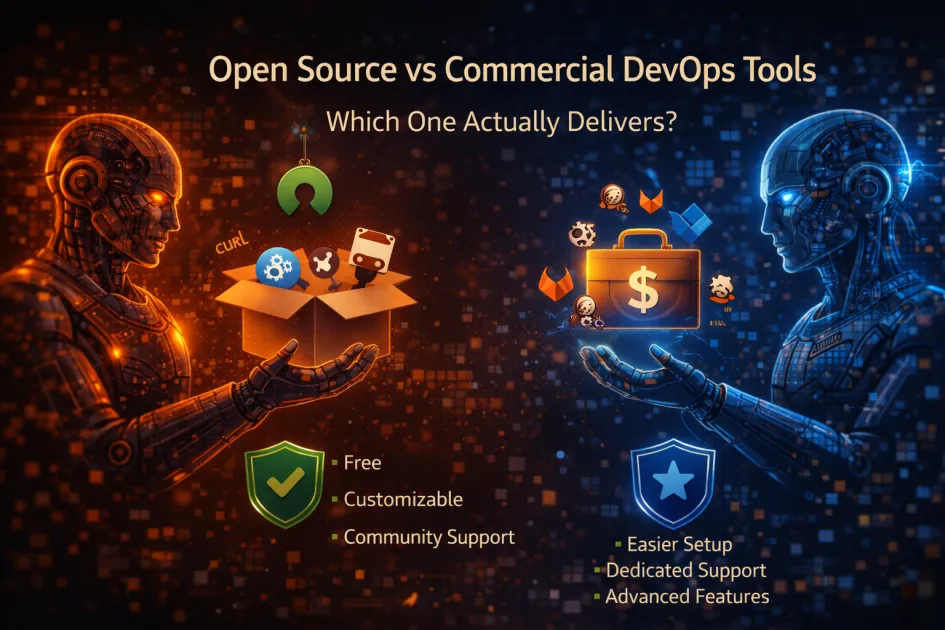
Open source DevOps tools are free to use, customizable, and community-driven, but they often demand more self-support and technical know-how. Commercial DevOps tools offer polished user experiences, official support, and integrated features, but come with licensing costs and less flexibility. Picking the right one depends on your team’s skills, project needs, risk tolerance, and how much you enjoy debugging at 2 a.m.
Definition Box
Open source DevOps tools are software platforms whose code anyone can access, modify, and distribute. The usual suspects include Jenkins, GitLab CE, and Ansible. Commercial DevOps tools are proprietary products sold by companies – think CircleCI, Azure DevOps, or GitHub Enterprise. These often bundle shiny dashboards and “click and forget” deployment wizards.
DevOps itself is a set of practices that combines software development and IT operations. The whole point is to shorten development cycles, increase deployment frequency, and deliver updates reliably. Both open source and commercial tools try to automate everything from code integration to infrastructure monitoring and continuous delivery.
Pros & Cons | Open Source DevOps Tools
Why Developers Love (and Sometimes Hate) Them
- Cost: Free as in “beer,” but remember your time isn’t.
- Flexibility: If you want to hack the code until it looks nothing like the original, go wild.
- Community: If you enjoy sifting through endless GitHub issues and Stack Overflow threads, there’s always a crowd.
- Transparency: You see what goes in – no mysterious black boxes hiding security flaws.
- Integration: Open source thrives on plug-ins and community add-ons, so you can glue anything to anything. Sometimes it even works.
But there’s a dark side:
- Support: Hope you like reading documentation. If something breaks, it’s you, the repo, and your search engine.
- Maintenance: Community projects die. Or get forked. Or just stop working with the latest OS update. Have fun chasing dependencies.
- Security: Yes, you can audit the code. But will you? There’s no official patch hotline when a zero-day drops.
Pros & Cons | Commercial DevOps Tools
What You’re Actually Paying For
- Support: When things break, there’s a number to call. (Just don’t expect instant miracles.)
- Polish: Commercial tools often look and feel better. UIs designed by someone who’s seen a color wheel.
- Maintenance: Updates, patches, new features – someone else is paid to care, so you don’t have to.
- Compliance: Need audit trails, access controls, and all that enterprise nonsense? Built in.
- Integration: Ecosystems like Azure DevOps or GitHub Advanced Security play nicely with other enterprise toys. Sometimes too nicely.
But it’s not all roses:
- Cost: Subscriptions add up. By the time you’ve added a few users and integrations, you’ll wonder if you should’ve just hired more engineers.
- Lock-in: Migrating away can be a nightmare. They want you to stay forever, and your data agrees.
- Customization: Want to tweak a core feature? Submit a ticket and wait. And wait. And… you get it.
Open Source vs. Commercial | Side-by-Side Comparison
| Feature | Open Source | Commercial |
|---|---|---|
| Cost | Free (your sanity may vary) | Recurring fees, sometimes per user or build |
| Support | Community forums & DIY | Official support, SLAs |
| Customization | Unlimited (if you can code) | Limited, vendor-controlled |
| Security | Transparent, but self-managed | Vendor-managed patches & compliance |
| Integration | Plentiful but may require elbow grease | Pre-built, sometimes proprietary |
| Scalability | Manual tuning required | Auto-scaling in the cloud (if you pay enough) |
When Should You Use Open Source or Commercial DevOps Tools?
Open Source is Best When:
- You have a team with strong technical skills
- You want full control over your pipeline
- Your budget is basically “whatever’s in the couch cushions”
- You enjoy breaking things and fixing them at odd hours
Commercial Wins When:
- You need enterprise features (compliance, audit, SSO, etc.)
- Your team needs to get things done, not just tinker
- Downtime is not an option (unless you like angry emails from the C-suite)
- You want someone else to panic when things go wrong
Still can’t decide? Many organizations blend both – using tools like Jenkins or Terraform for flexibility, and adding something like GitHub Enterprise or Atlassian Bamboo for the “please just work” factor.
Real-World Examples That Don’t Read Like Vendor Ads
- Netflix: Famously uses Spinnaker (open source) for continuous delivery, but pays for commercial security tools and support.
- Startups: Love GitLab CE and Jenkins for cost reasons, but often bolt on Snyk, Datadog, or PagerDuty (all commercial) for monitoring and security.
- Enterprises: Bank on Azure DevOps or IBM UrbanCode for compliance, but still sneak in open source scripts and Ansible playbooks where they can.
For a quick comparison, think of it like this: open source is a customizable LEGO set, while commercial tools are IKEA furniture – pre-packaged and ready to assemble (until you lose the Allen key).
FAQ
Which tools are most popular in each camp?
Jenkins, GitLab (Community Edition), and Ansible top the open source list. Commercial heavyweights include CircleCI, Azure DevOps, and GitHub Enterprise.
Are open source DevOps tools secure?
They can be, but you’re in charge of updates and patching. Commercial tools offload some of that headache but don’t guarantee invulnerability.
How hard is it to migrate between open source and commercial tools?
Painful. Data formats, integrations, and scripts rarely play nicely. Plan for downtime and lots of coffee.
Can you mix open source and commercial DevOps tools?
Absolutely. Most real-world setups use a hybrid mix to balance costs, features, and sanity.
Is open source always cheaper than commercial?
Not always. Factor in support, lost productivity, and the cost of hiring talent who can wrangle open source. Sometimes, “free” gets expensive fast.
Wrap-up | Stop Overthinking, Start Building
There’s no perfect answer, just a stack of trade-offs. If your team loves tinkering and hates vendor lock-in, embrace open source. If uptime, compliance, and support matter more, go commercial – or blend both and let your future self sort out the mess.